DESIGNING FOR THE DECISIONS BEHIND
PROJECT DELIVERY.
How I partnered with a Project Manager to uncover staffing and financial challenges, then designed a connected experience to make complex operational decisions easier to understand.
Don’t just view the interface. Explore it.
Experience how project managers monitor project health, evaluate contractors, and forecast staffing costs.
A STAFFING DECISION RARELY HAPPENS IN ISOLATION.
WorkFlow supported a business that delivered client projects using a changing mix of contractors. Each project came with its own timeline, budget, staffing requirements, and expectations for delivery. A single resource decision could affect several of those constraints at once.
The operational reality
Managers needed to monitor multiple projects while keeping track of people, availability, progress, and spending.
The design opportunity
Make the relationships between projects, contractors, and financial commitments visible in the moments decisions were being made.
THE REQUIREMENTS WERE CLEAR. THE WORKFLOW WASN’T.
The initial requirements were straightforward: create a job, set a timeline and budget, enter project details, and assign contractors. Working with a Project Manager, I looked beyond those actions to understand what managers needed to know before making each decision.
Create a job
Enter project details, timeline, and budget.
Assign contractors
Choose people to staff the project.
Manage the job
Maintain project information and assignments.
Understand project health
Deadline proximity, priority, and current status.
High priority · In progress
Evaluate contractor fit
Availability, capacity, and relevant technical skills.
Frontend · Backend · Database
Forecast before committing
Understand assignment costs against the project budget.
Remaining budget
Project setup alone did not show managers how urgent or healthy a job was.
Surface deadlines, priority, and status in a centralized overview.
A contractor name did not explain availability, capacity, or technical suitability.
Make staffing availability and relevant skills visible during selection.
An assignment could change the financial position of the project.
Provide cost previews and financial projections before commitment.
FROM MANAGING PROJECT INFORMATION TO SUPPORTING PROJECT DECISIONS.
The opportunity was to connect project health, contractor availability, and financial forecasting into one coherent workflow. Instead of treating each requirement as an isolated feature, the experience could progressively surface the information managers needed to understand a project, evaluate staffing, and assess the budget impact before committing.
ORGANIZE THE EXPERIENCE AROUND THREE DECISIONS.
Instead of treating each problem as a separate dashboard feature, I structured the experience as a progression: understand what is happening, assess the financial implications, and evaluate whether a contractor is the right fit.

OPERATIONAL VISIBILITY
Give project managers a clear view of project health, deadlines, and staffing needs.

FINANCIAL INTELLIGENCE
Help managers understand the budget implications of contractor assignments before committing.

QUALITATIVE EVALUATION
Support more informed contractor selection by considering experience, skills, and project fit.
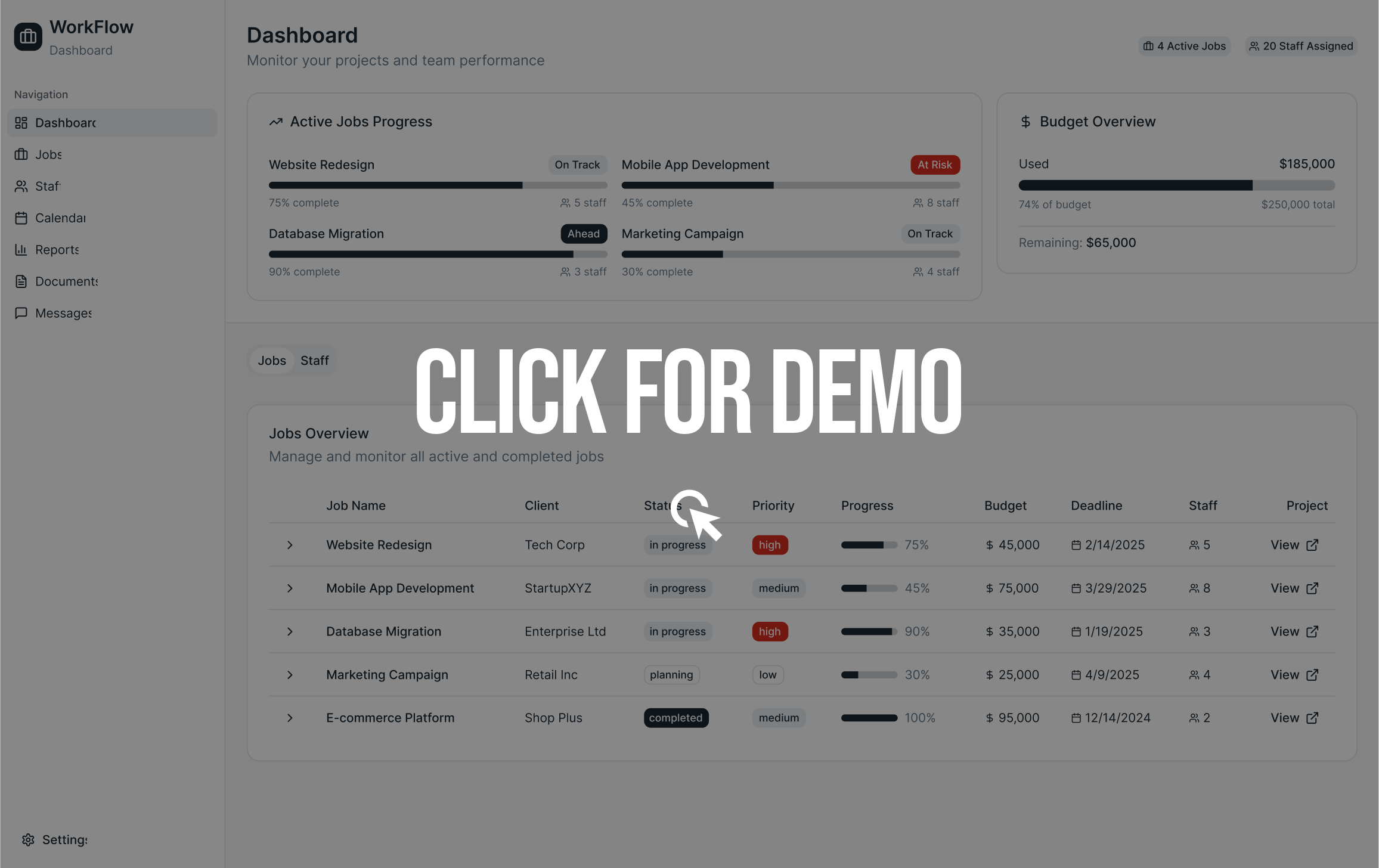
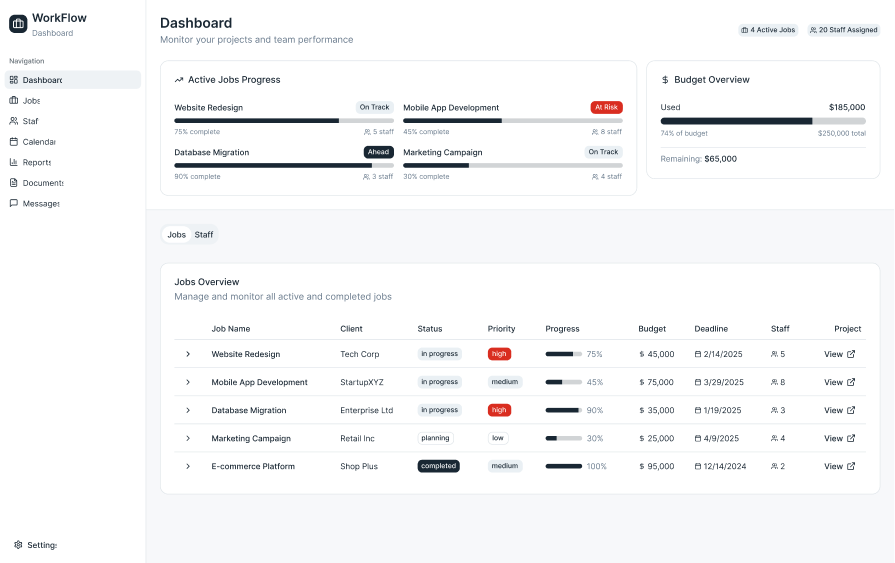
MAKE PROJECT HEALTH SCANNABLE BEFORE ASKING USERS TO ACT.
I prioritized project progress, staffing counts, deadlines, and budgets in the overview. This gave managers a place to identify which projects might need attention before opening a specific job for more detail.
Why this hierarchy?
The overview should answer “Where should I look?” rather than attempt to answer every question about every project.
The tradeoff
Showing fewer details at the top level meant relying on a clear path into the project-specific experience.
KEEP THE STAFFING DECISION IN THE PROJECT CONTEXT.
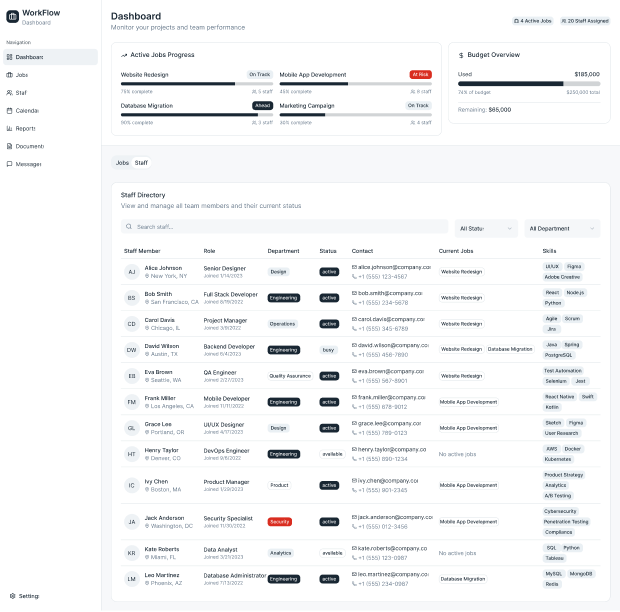
The staff directory gives a broader view of workforce capabilities and current assignments. Inside a project, the staffing experience focuses that information around a specific need: who is already assigned, what capacity is available, and which contractors could fill the gap.
Why two views?
The directory supports workforce visibility; the project staffing screen supports a specific assignment decision. Each has a different job to do.
The tradeoff
Some staff information appears in both places, but the repetition keeps users from losing context while making an assignment.
MAKE THE COST OF A DECISION VISIBLE BEFORE IT’S MADE.
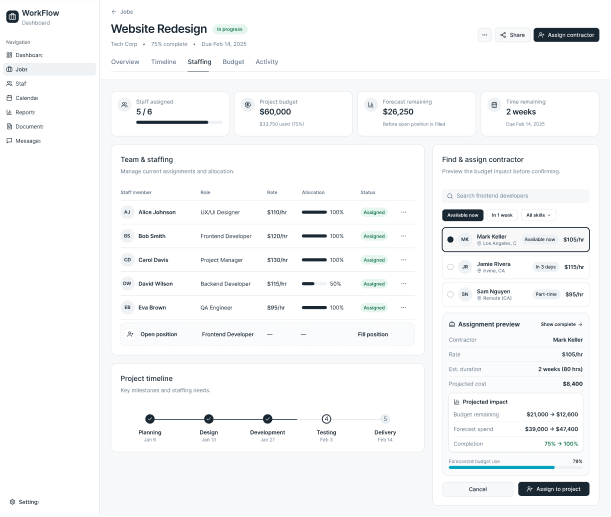
An hourly rate doesn’t tell a project manager what an assignment will do to the remaining budget.
A staffing decision is also a financial decision.
A contractor may have the right skills and availability without being financially feasible for the project. The hourly rate is only one part of the equation. Managers also need to understand how a proposed assignment affects projected spending, the remaining budget, and the overall financial position.
Surface the financial consequences of staffing without turning contractor selection into a separate planning exercise.
First, make estimated assignment costs visible alongside contractor choices. Then, let managers expand into a cumulative financial projection through “Show complete,” without losing their place in the staffing workflow.
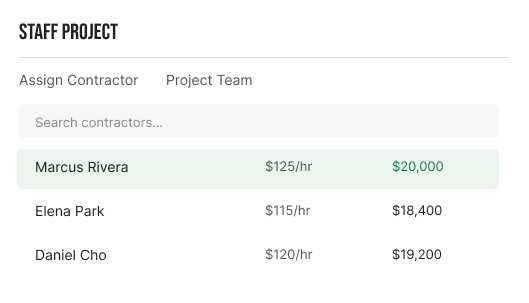
See the immediate cost implication while selecting a contractor.
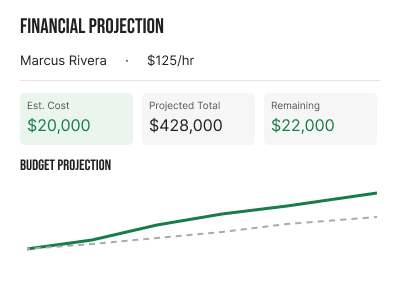
Compare projected costs and budget impact without leaving the staffing workflow.
Why progressive disclosure?
Keep contractor selection focused, with deeper financial detail available on demand.
Why a slide-out drawer?
Preserve the staffing context while examining cumulative costs, budgets, and proposed assignment impact.
The key decision was not simply to add financial data. It was determining when that information should appear, how much detail was appropriate, and how to keep the proposed assignment connected to the budget impact.
FROM STAFFING VISIBILITY TO FINANCIAL CONFIDENCE.
The goal was to help managers evaluate staffing decisions within the project’s financial constraints, rather than treating contractor selection and budgeting as disconnected activities. The interface supports an informed decision while leaving control with the manager.
Interface figures and contractor details shown here are illustrative; they are not measured project outcomes.FINANCIALLY FEASIBLE DOES NOT ALWAYS MEAN THE RIGHT FIT.
Cost and availability are only part of the staffing decision. I also explored how AI-assisted qualitative assessment could help managers consider relevant skills, experience, and evidence of project fit without manually reviewing every detail of a candidate’s background.
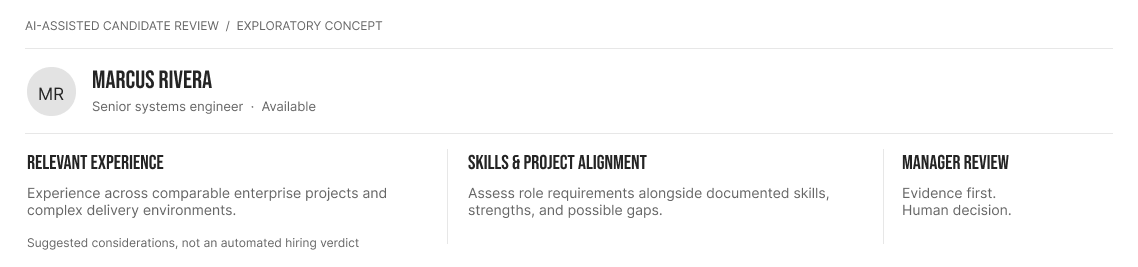
The intention was to support human judgment, not replace it. This concept should be presented as a design direction unless its implementation can be verified.
THE REAL DESIGN CHALLENGE WAS CONNECTING DECISIONS.
WorkFlow reinforced that enterprise UX is not simply about organizing more information on a screen. It is about understanding the operational choices people make, exposing the right information at the right moment, and designing a path from uncertainty to action.
What I contributed
I collaborated on problem definition with a Project Manager, translated business constraints into workflows, and designed how project, staffing, and financial information could work together.
What I would continue refining
Validate the forecast with real project scenarios, test how managers interpret the comparison, and establish clear evidence standards for any AI-assisted candidate assessment.